

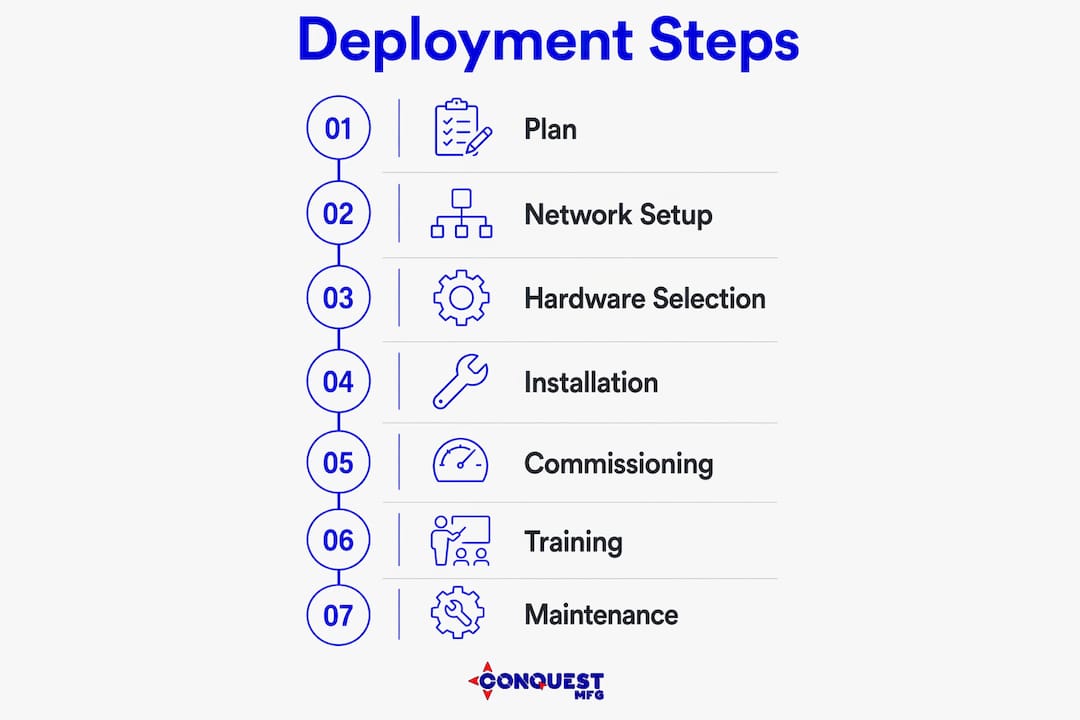
A reliable security deployment starts with one decision: lock in your operational goal and build your network infrastructure before a single device ships. Every other step follows from those two anchors.
Five must-have deliverables for any deployment:
- Defined operational objective — deterrence, evidence capture, or remote verification
- Network readiness confirmation — cabling certified, VLANs configured, PoE budget verified
- Device schedule and placement plan — device types, mounting locations, and field-of-view diagrams
- Commissioning test report — signed acceptance checklist before the installer leaves site
- Documented handover packet — as-builts, IP map, user accounts, and maintenance schedule
When rapid coverage or temporary site protection is required, Conquest Mfg Portable Rapid-Deployed Video Surveillance Towers and the Conquest Mfg Mobile Security Semi Trailer deliver camera-ready infrastructure in hours, not weeks — without the civil work a fixed installation demands.
Table of Contents
- What does a solid pre-deployment checklist cover?
- Why network infrastructure must come first
- How do you choose hardware and placement for your site?
- What does the operational layer require?
- How should you run installation and commissioning?
- Handover, training, and maintenance: what operations staff need
- Compliance and privacy considerations for U.S. deployments
- What does a typical deployment timeline and budget look like?
- Key Takeaways
- What field deployments have taught us about mobile security
- Conquest Mfg rapid-deploy security solutions: get a quote
- Authoritative sources and further reading
What does a solid pre-deployment checklist cover?
Deploying security systems is an operations project, not a shopping exercise. Define the operational goal first: deterrence changes camera placement and lighting requirements; evidence capture drives resolution and retention targets; remote verification shapes network bandwidth and VPN access rules.
Site survey items to document before pricing:
- Measured floor plan with door schedules and exterior elevations
- Occupancy patterns by time of day and day of week
- Privacy boundaries (restrooms, medical rooms, neighboring properties)
- Power availability, conduit pathways, and AHJ permit constraints
- Mobilization constraints for temporary or remote sites
Lock these procurement inputs before issuing a purchase order: device schedule, PoE and power budget, storage and retention targets, network VLAN and IP plan. Demand stamped drawings, as-built standards, Fluke-certified cabling reports where structured cabling is in scope, and a maintenance SLA at contract signing.
Pro Tip: Assign one accountable project manager from procurement and one from operations. Without both, configuration drift is almost guaranteed by the time commissioning begins.
Why network infrastructure must come first
Industry experts consistently recommend installing and verifying network infrastructure before security devices arrive on site. Security cameras, access control panels, and recorders all depend on a stable network platform. Discovering a misconfigured VLAN or an undersized PoE switch after devices are mounted costs far more to fix than catching it during infrastructure commissioning.
Cabling and pathway decisions:
- Cat6A for runs up to 328 feet with PoE+ devices; fiber for longer backbone runs or electrically noisy environments
- Conduit required in new construction and for any exterior or plenum pathway
- Every cable labeled at both ends per TIA-606 before testing
PoE budgets determine switch selection. Add up the maximum wattage draw for every powered device, then size the switch to no more than 80% of its rated PoE capacity. Pair every recorder and network switch with a UPS sized for at least 30 minutes of runtime during a power event.
For bandwidth, multiply camera count by per-stream bitrate (H.26x at 1080p typically runs 2–4 Mbps per stream) and add 20% headroom. Storage sizing follows: bitrate × camera count × seconds per day × retention days, divided by 8 for gigabytes.
Place security devices on a dedicated VLAN, isolated from corporate traffic. Coordinate with IT on firewall rules and NAT before the first device is configured.
Pro Tip: Bench-test switch ports, VLAN tagging, and PoE delivery at each planned endpoint before devices arrive. Catching a dead port in the lab takes minutes; catching it on a ladder takes hours.
How do you choose hardware and placement for your site?
Match device type to the operational job first. Detection favors wide-angle sensors and PIR coverage; identification requires narrow-angle, high-resolution cameras with controlled lighting; deterrence benefits from visible housings and audible warnings.

| Solution category | Deployment speed | Network & power | Coverage / payload | Scalability | Maintenance | Key cost drivers |
|---|---|---|---|---|---|---|
| Fixed wall/ceiling cameras | Days to weeks | Structured cabling, PoE switch | Fixed field of view | Add drops and switches | Low if documented | Cabling per drop, labor |
| Perimeter sensors / fence detection | Days | Low-power wired or wireless | Perimeter linear footage | Moderate | Periodic calibration | Sensor count, conduit |
| Access control readers | Days to weeks | Wired data + power | Per-door coverage | Add panels and doors | Low with firmware plan | Door hardware, panels |
| Conquest Mfg Portable Rapid-Deployed Towers | Hours | Solar/battery or shore power, cellular or Wi-Fi | multi-camera payload | Relocate or add units | Field-serviceable | Unit cost, mobilization |
| Conquest Mfg Mobile Security Semi Trailer | Hours to one day | Onboard generator, full network stack | Wide-area multi-camera | Redeploy by site | Trailer service intervals | Unit cost, transport |
Placement rules that affect coverage and durability:
- Mount cameras at typical heights suitable for identification and wide-area detection
- Access control readers: mount 15–48 inches off finished floor to meet ADA reach ranges
- Never anchor readers or heavy camera housings to single drywall — use structural backing, toggle bolts into CMU, or through-bolt into steel
- Show field-of-view polygons on placement diagrams against doorways, service alleys, loading docks, and any temporary site boundary
For temporary worksites or remote oilfield pads where trenching is not feasible, portable surveillance towers eliminate the civil work entirely. The Conquest Mfg Mobile Security Semi Trailer adds onboard power and network infrastructure, making it a self-contained command point for large or multi-zone sites. Review the security semi trailer buying guide for full payload and specification details.
What does the operational layer require?
Most installation failures trace back to the operational layer — storage sizing, alert logic, and remote access permissions — not faulty physical mounts. Hardware is necessary; the configuration that makes footage usable in an incident is what actually matters.
Storage sizing inputs:
| Variable | Example value | Effect on capacity |
|---|---|---|
| Resolution | 1080p | Baseline |
| Frame rate | 15 FPS | Moderate |
| Codec | H.26x | significant reduction vs. H.26x |
| Cameras | 20 | Linear multiplier |
| Retention | 30 days | Linear multiplier |
Map every alert to a clear chain: event → notifier → responder. Keep alert rules narrow. A motion rule that fires on every passing vehicle trains staff to ignore alerts; a rule scoped to after-hours activity in a restricted zone generates responses.
For access control, define user roles before configuration: operator, administrator, and auditor at minimum. Set credential expiration schedules and document the process for removing vendor or temporary accounts.
Pro Tip: Size retention around the incident lifecycle, not just a round number. Most investigations require at least a month of retention; regulated industries often require longer periods. Build the export procedure and chain-of-custody steps into the handover packet before go-live.
How should you run installation and commissioning?
A disciplined sequence reduces callbacks and false alarms: pre-install bench tests, infrastructure and wiring, device mounting, configuration, and full-system commissioning with fail-safes tested before sign-off.
Acceptance checklist before the installer leaves:
- Every device online and reporting to the head-end
- Field of view verified from the camera scene — not just the configuration screen
- User credentials tested at each controlled door
- Alarm path verified end-to-end: trigger → panel → notification
- Mobile and remote access confirmed from an off-site connection
- Power failover simulated: UPS tested, recorder behavior on power loss confirmed
- Signed punch list with open items, owners, and due dates
Stand in each camera scene and verify the image. Present credentials at each controlled door. Trigger alarms to confirm the full notification path. A system that has not been walked through this way is a collection of disconnected devices, not an operational security capability.
As-built deliverables required at final acceptance: device schedule, IP address map, cable labeling and wiring schedule, Fluke test reports, and a signed acceptance document.
Handover, training, and maintenance: what operations staff need
A clear handover process with a documented support route and practical training is what turns devices into a trusted operational capability.
**Handover packet contents:
**
- User accounts with access levels documented; admin credentials transferred securely
- As-built drawings, IP map, and device schedule
- Commissioning test reports and signed acceptance checklist
- Maintenance schedule with firmware patch windows and credential audit dates
Training should cover two tracks: operator workflows (arming/disarming, clip review, export procedures) and admin tasks (user management, retention changes, adding devices). Record both sessions and place them in the project file.
Maintenance schedule minimums: regular physical inspection, firmware updates on a defined patch window with change control, UPS battery test annually, and periodic credential audits.
Pro Tip: Require a 30/60/90-day support checkpoint in the contract. Use the 30-day call to remove temporary installer and vendor accounts — those credentials are the most common access-control gap left after a deployment.
Compliance and privacy considerations for U.S. deployments
Four standards and authorities apply to most U.S. commercial security deployments:
- NIST SP 800-82 and related guidance — cybersecurity controls for networked security devices, including firmware update policy and network segmentation
- FCC Part 15 and applicable rules — compliance for any wireless links, including cellular-connected towers and Wi-Fi bridges
- OSHA 29 CFR 1926 — fall protection when working at height, lockout/tagout for electrical work on live circuits, and firestopping for conduit penetrations through fire-rated assemblies
- Local AHJ and municipal ordinances — camera placement near public rights-of-way, recording consent requirements, and permit approvals
Privacy controls: avoid coverage of restrooms, locker rooms, and areas where a reasonable expectation of privacy exists. Reduce resolution or mask zones for sensitive scenes. Post visible notices where recording is active, as required by state law.
Document permit approvals in the project file and include compliance checks as formal acceptance criteria — not as an afterthought after commissioning.
For field teams, the industrial safety checklist from Conquest Mfg covers installation safety steps that align with OSHA field requirements.
What does a typical deployment timeline and budget look like?
| Phase | Typical duration | Key activities |
|---|---|---|
| Discovery and design | 1–2 weeks | Site survey, device schedule, network plan, permit applications |
| Network infrastructure build | 1–3 weeks | Cabling, switch installation, PoE verification, VLAN configuration |
| Device installation | 1–2 weeks | Mounting, termination, head-end setup |
| Configuration and commissioning | 3–5 days | Programming, acceptance testing, punch list |
| Training and handover | 1–2 days | Operator and admin training, documentation transfer |
Key cost drivers:
- Structured cabling: labor and materials per drop vary significantly between new construction and retrofit
- Switch and PoE capacity: enterprise-grade managed switches with sufficient PoE budget carry a meaningful premium over unmanaged alternatives
- Storage: NVR/server sizing and redundancy tier
- Labor: retrofit through occupied facilities typically costs more than new construction
- Permit and coordination time: AHJ review cycles vary by jurisdiction
Schedule levers that actually work: phase cutover by area to keep critical access points live, pre-stage and bench-test all devices before mobilization, and lock the final device count before the installer mobilizes to avoid change orders.
Key Takeaways
A successful security equipment deployment requires network infrastructure first, a defined operational goal, and a signed commissioning report before the installer leaves site.
| Point | Details |
|---|---|
| Network before devices | Install and certify cabling, switches, and VLANs before any security device arrives on site. |
| Define the operational goal | Deterrence, evidence capture, and remote verification each drive different device specs and placement rules. |
| Commission with a signed checklist | Walk every camera scene, test every door credential, and verify the full alarm path before acceptance. |
| Document everything | As-builts, IP maps, Fluke reports, and a maintenance schedule are non-negotiable handover deliverables. |
| Conquest Mfg for rapid coverage | Conquest Mfg Portable Rapid-Deployed Towers and Mobile Security Semi Trailers deploy in hours for temporary or remote sites with no civil work required. |
What field deployments have taught us about mobile security
The conventional wisdom in security deployments is that fixed infrastructure is always more reliable than mobile. Field experience tells a different story. A fixed system that takes six weeks to design, permit, and cable is not available for the first six weeks of a project. A Conquest Mfg Portable Rapid-Deployed Tower that is on-site and operational in hours covers that gap completely.
What manufacturing and field feedback have shaped in Conquest Mfg’s tower and trailer designs is a focus on three things: resilience under field conditions, serviceability by a single technician without specialized tools, and rapid mobilization without civil prerequisites. Those priorities came directly from operators at remote oilfield pads and construction sites who needed coverage on day one, not week six.
The operational advice that follows from that experience: prefer solutions that are field-serviceable, come with documented as-builts from the manufacturer, and include a single accountable project contact. A system that cannot be serviced by the team on-site is a liability, not an asset. The mobile security infrastructure Conquest Mfg builds is designed around that principle from the first weld.
Conquest Mfg rapid-deploy security solutions: get a quote
Conquest Mfg Portable Rapid-Deployed Video Surveillance Towers and Mobile Security Semi Trailers are built for deployments where fixed infrastructure is not feasible, not fast enough, or not cost-effective. Both solutions ship camera-ready with onboard power options, and both are designed for field serviceability by your own team.

Every Conquest Mfg security deployment engagement includes project management, documented as-builts, commissioning support, and training options. To start a procurement conversation, prepare your site drawings, operational goals, and mobilization timeline. Conquest Mfg’s team will specify the right tower or trailer configuration for your site and coverage requirements.
Explore mobile security tower options or review the full security semi trailer buying guide to compare payload, power, and deployment specifications. Contact Conquest Mfg directly to request a quote tailored to your project.
Authoritative sources and further reading
- The Right Order of Operations for Physical Security and Network Installation — covers sequencing when security and network upgrades are in the same scope
- Commercial Security Systems Installation Guide — step-by-step installation sequence, commissioning acceptance criteria, and project management discipline
- Installation of Video Surveillance Systems — operational layer configuration: storage sizing, alert logic, and remote access
- Security Systems Installation Step-by-Step Process — bench testing, handover packet contents, and training workflows
- Structured Cabling and Installation Standards — Fluke certification requirements, ADA reader mounting heights, and documentation standards
Request as-built templates, retention calculators, and commissioning checklists from your equipment supplier or integrator before mobilization. Having those documents ready at contract signing prevents the most common source of project delay.